最近折腾n8n,结果好多服务、mcp都需要代理,不然的话用不起来。暂时又不想搞个境外服务器,因为阿里云和腾讯云的服务器就好几个了。于是想在其中一台机器上装个代理的镜像,然后本机器或者其他的机器使用这个代理。
我的服务器都是centos,首先在一台机器上安装下镜像,参考官方文档《https://v2raya.org/docs/prologue/installation/docker/》。
如果没有特别的设置,那么直接按照命令去执行就行。但是这个应用使用范围这么广,特定的端口肯定被扫描了,所以放在服务器上的话还是改一下端口比较好。
这是一个传统后端启动的示例:
docker run -d \
  --restart=always \
  --privileged \
  --network=host \
  --name v2raya \
  -e V2RAYA_LOG_FILE=/tmp/v2raya.log \
  -e V2RAYA_V2RAY_BIN=/usr/local/bin/v2ray \
  -e V2RAYA_NFTABLES_SUPPORT=off \
  -e IPTABLES_MODE=legacy \
  -v /lib/modules:/lib/modules:ro \
  -v /etc/resolv.conf:/etc/resolv.conf \
  -v /etc/v2raya:/etc/v2raya \
  mzz2017/v2raya
自己的话,肯定要修改一下端口,所以选择使用下边这个示例
docker run -d \
  -p 2017:2017 \
  -p 20170-20172:20170-20172 \
  --restart=always \
  --name v2raya \
  -e V2RAYA_V2RAY_BIN=/usr/local/bin/v2ray \
  -e V2RAYA_LOG_FILE=/tmp/v2raya.log \
  -v /etc/v2raya:/etc/v2raya \
  mzz2017/v2raya
安装成功,把指定的端口在防火墙里放开,用本机的浏览器直接访问,可行。创建了账号,然后导入订阅,到此为止,目前还算正常。
但是还需要验证。用ping没法加代理,于是用yum install httping安装了httping工具。
直接执行httping -x localhost:20170 -g http://www.google.com 反回了short read during receiving reply-headers from host。
点着点着发现v2ray2的页面里,点开导入的配置之后,需要选中线路并连接。。。忘了这茬。选中常用线路,点击“connect”,emmm,报了failed to connect: failed to connect: not support Trojan: strconv.Atoi: parsing “”: invalid syntax。根据文档《https://feiniu.nas50.cn/forum.php?mod=viewthread&tid=1792》操作时,点击“启动”的时候报failed to start v2ray-core: not support Trojan: strconv.Atoi: parsing “”: invalid syntax,搜了一下,这个问题好像讨论的不多。
docker各种不好使,但是应该是我使用的不对。最终在服务器上直接装的。
先到发布文件页面下载文件https://github.com/v2rayA/v2rayA/releases,我下载了linux的运行文件和rpm文件,最终使用的rpm文件。
然后使用命令 sudo yum install installer_redhat_x64_2.2.7.4.rpm 安装了下载的rpm包。
systemctl start v2raya 启动服务
systemctl enable v2raya 设置为开机启动
到服务器网络策略里,把2017的端口放开。访问ip:2017,发现服务没正常启动,去服务器的/var/log/v2raya.log里去看日志,发现在在在下载必要的文件“downloading missing geoip.dat and geosite.dat”。但是因为当前服务器还没代理,这些文件也下载不下来。
https://github.com/v2fly/geoip/releases/latest/download/geoip.dat
我把之前用docker启动时候运行时创建的文件给复制到对应的下载目录去了,启动,可以正常启动了
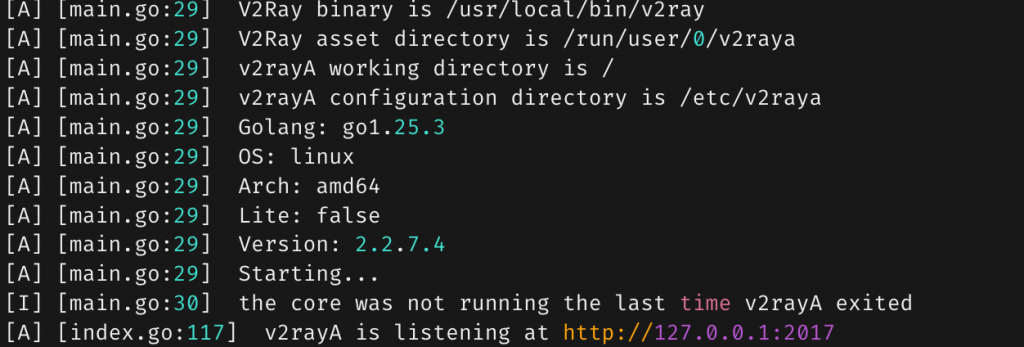
通过浏览器访问管理页面,正常。再选中线路,然后启动,又报错了:
Failed to start: main/commands: failed to load config: [/etc/v2raya/config.json] > infra/conf/rule: invalid field rule > infra/conf/rule: failed to load geoip: private > infra/conf/geodata/memconservative: failed to decode geodata file: geoip.dat > infra/conf/geodata/memconservative: country code private not found in geoip.dat

看起来有点像是我复制过来的文件有点问题。
终于,在重启服务的时候发现,/etc/v2raya下的文件都会被替换。config.json来自哪里还不确定,但是两个ip文件是来自/root/.local/share/v2ray 这里。把我自己下载的文件挪到这个目录来,重启,再次到管理页面点启动,OK了!